Overview
All Redprairie WMS implementations need an RF Solution - a solution for physical devices that are used on the floor to perform most of the warehouse functions. Man Hours spent on these devices far exceed those on GUI screens. But the solution for these devices looks the same as it did a decade ago. Internally the infrastructure evolved to a Java based telnet emulation but from the point of view of an end user it has not improved much.
At Oracular we have been working with RedPrarie systems for a long time and we understand the pains and opportunities in such implementations. Improving the RF Solution is part of that.
We have identified following areas as opportunities that we have addressed in our new solution.
- Connection Setup
- Touch Support
- Screen Layout
- Additional Information
- Voice Support
Solution Overview
Our solution is an Android app that is an evolution of our earlier solution. While that solution was from the point of view of ad-hoc use - here our vision is to provide a solution for the warehouse floor. As several customers are now choosing Android platform - the solution is a natural fit.
Whereas the standard RP solution is a thin telnet emulation - our solution builds on top of that. All of the delivered and custom RF screens would work without any tweaks - but at the same time the solution can be enhanced by providing additional contextual information to the user.
In order to make it happen, our solution makes a direct connection to the MOCA server so that it can access it and also keeps a telnet window open. It also utilizes advanced screen scrapping and keyboard manipulation to streamline the data management.
Salient Features
Following is a list of some key features that we have incorporated in our solution.
Connection Setup
A typical warehouse may have hundreds of these devices and the typical users are not technically savvy. So maintaining these becomes a chore. Each device needs to have some setup done for following reasons:
- Define environments that it can connect to.
- Identify it individually to the application so that DEVCOD variable is set properly
Environment management can become a major headache for system administrators. Updating the information on several devices is time consuming. Using the same device against multiple environments or re-purposing a device is not straight forward either.
Our solution solves this problem by defining a single URL for all connection details which will remain the same for all devices. All of the changes are then done on that single location.
Profile
First we have a concept of profiles. These are maintained by a simple XML file and these point to the various MOCA environments that the devices may connect to:
<ossi_rf_emul_profiles><profile name="env_1">
<profile name="env_2">
</ossi_rf_emul_profiles>
This defines following:
| XML Tag | Value | Comments |
| name | Arbitrary Value | Provide a name of this environment |
| app_url | MOCA URL | URL that connects to this environment |
| short_name | Arbitrary Value | Abbreviated name of the environment to show on the emulator |
| prompt_user_id_first | 0 or 1 | Ask for username and password after connection |
Profile_dtl
In the same location, we will have profile detail XML files for each of the profiles defined above. The XML file is named profile_dtl_name.xml. For example:
<ossi_rf_emul_profile><setup name="env1">
</ossi_rf_emul_profile>
This defines following:
| XML Tag | Value | Comments |
| name | Arbitrary Value | Provide a name of this environment |
| mtf_url | MTF URL | Host and port of the MTF telnet connection |
| short_name | Arbitrary Value | Abbreviated name of the environment to show on the emulator |
| wh_id | Warehouse | As defined in wh table |
When our emulator starts, user selects the appropriate profile and then profile detail. With this input we know the application URL, MTF URL, and warehouse Id. The application will then prompt for username and password for the application URL. This will allow the emulator to directly connect to the MOCA server and at the same time open a telnet connection to the MTF server.
Device Identification
In order to identify each physical device to the application server RedPrairie has used various techniques over time including:


- Requiring fixed IP addresses and using last three digits
- Utilizing "answer back" and then responding with a value from the device.
Both can work but are not easy to setup. Fixed IP addresses are not suitable at all these days. Answer back works but requires per-device configuration.
Our solution in this case is to support these legacy concepts and extend it further to make things simpler. Each physical device provides several interesting identifiers that can be utilized for example:
- IP Address (if fixed IP address)
- Bluetooth Id
- MAC Address
- Serial Number
MAC Addresses and serial numbers are especially interesting since they are often known from the product packaging and are already set. In RedPrairie we already have a concept of defining each device as "RF Terminal" using "RF Terminal Maintenance"

As you can see here rather that utilizing "answer back" we define one of the following attributes for each device - and while defining we can use wild cards:
- IP Address
- Bluetooth Id
- Mac Address
- Serial Number
So in our solution when the "RF Terminal Id" prompt shows up on the emulator, we automatically key in the corresponding terminal id.

Touch Support
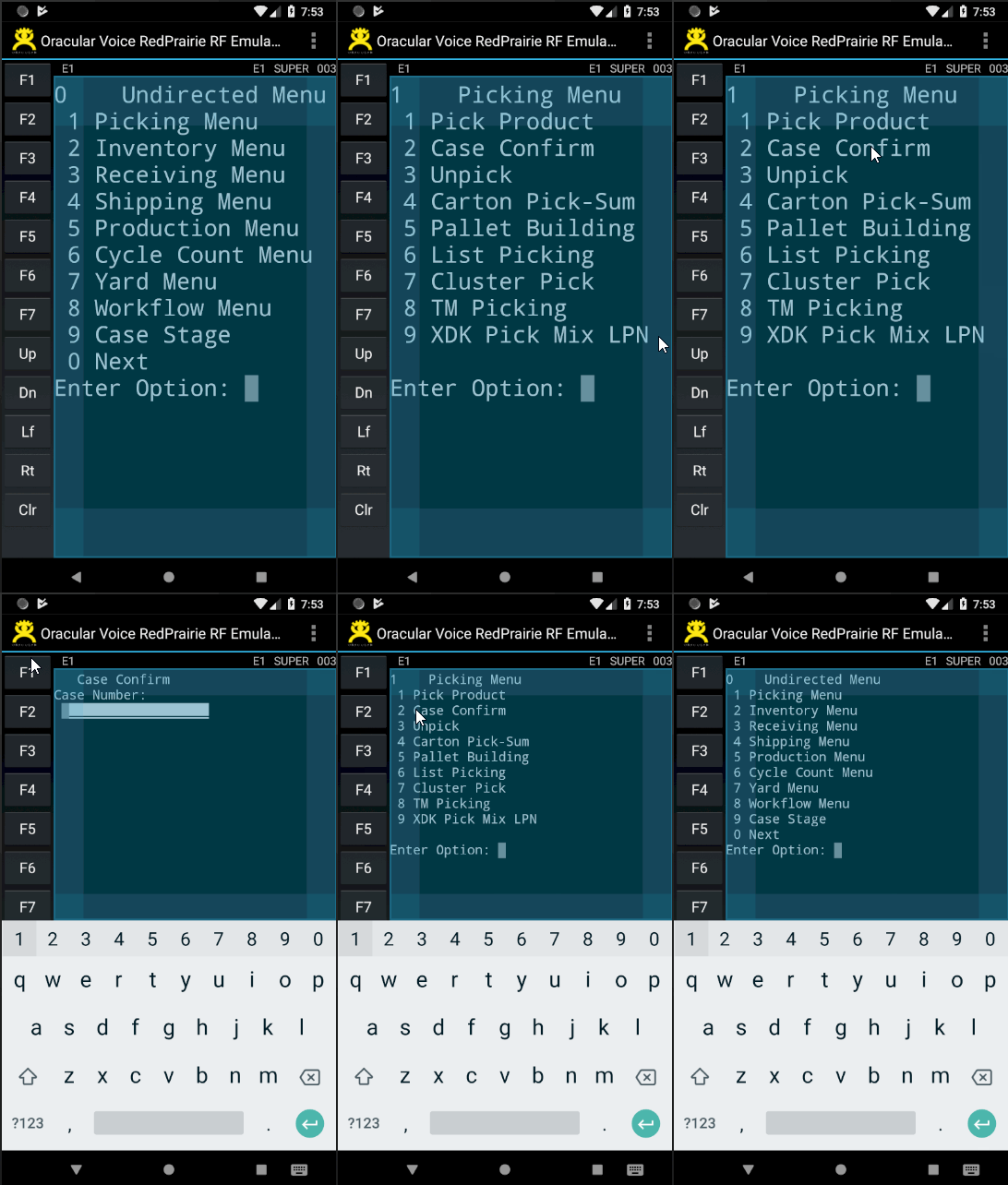
Some hardware devices are quite compact where keys are quite small and typing can be tricky. Our emulator provides touch support. This comes in handy for situations like:


- Selecting menu options
- "Pressing" Function keys
Screen Layout Enhancements
15 years ago defining an RF screen in terms of lines and columns of characters made sense but today these devices have high resolution screens - so in reality a lot of usable real estate is wasted. Our solution maximizes the real-estate in several ways:

- Function Key pallet is displayed on left side - making it easier to manipulate them. Refer to the images displayed above to see the function key pallet.
- Soft Keyboard support. Refer to the image above to see how the soft keyboard appears and disappears
- Automatically Zoom In and Zoom Out to maximize the use of real-estate. Refer to the image above to see how screen automatically zooms in and out based on the soft keyboard
- Top of the screen provides connection details like environment, user, etc.

- Bottom section of the screen can provide additional contextually sensitive information (described below)


Additional Information
RedPrairie standard RF screens often need to be complimented with additional information. They do not provide simple ways of providing that so sometimes users would switch to alternate front end with GUI, or have reports. Our approach in this case is to utilize the full capabilities of the devices and allow users to extend the view with additional information based on the context. For instance if a pick directs you to a location we could show the inventory in the location along with its attributes like lot, and origin. We can show multiple pages and the information provided can be different for different users. The information could be from external sources as well, e.g. ERP or external websites.
This is defined by users themselves and is not a development task.
LES Command Maintenance
We use the les_cmd table to store the commands that are used for this purpose. This allows us to make changes without needing "mbuild" and thus avoid rollout requirements. When we execute these commands we always execute the highest level commands - thus providing a mechanism for overriding them as well.

If we want to show a URL then the command returns a special variable called "url":

We have two types of commands - the ones that show data (as shown above) and others that detect the context. These commands always return one row and one column with a value of 1 or 0:

Additional Information Definition
Additional RF Form Information is defined as a collection. Several pages may be defined in one collection. The collection also describes how it fetches the context from the RF form that is running. The screenshot below indicates that "wrkref" is scrapped from the screen to establish context. Then three pages will be displayed below the form for additional information. Each "page" has associated command which would return the data.

Setups
We have defined the various page groupings above. To use them in a specific context we use the concept of "setups". Several setups can be defined for an RF form. Each setup has an associated "condition command" and "Additional Information Id". The first setup where the conditional command returns true will be used. This concept can be used to display different types of additional information on same RF form. For example we could show different data based on type of user or other context information. A supervisor could, for example, see the inventory levels in the system while doing counting but other users will not.

How it all comes together
When a user goes into an RF form, we check if this form has a setup which is active based on the pre-condition defined. If there is one we then find the various pages and the associated commands. We utilize the bottom section of the RF form to show this data where various pages are displayed as tabs and data is displayed in a grid.

Voice Support
If devices support voice, the RF emulator can utilize it as well. It can speak the form name and the field name.
Conclusion
We have been working with RedPrairie WMS for a long time and understand the intricacies of the architecture. We also understand the deployment framework and use cases. This allows us to appreciate the gaps and this solution is based on years of experience in deploying these solutions in various industries and environments. Once deployed users will appreciate the new capabilities which will result in ease of use and improvement in quality and throughput. The system support will also become easier.
If you want additional information about this solution or any other Oracular solutions or initiatives contact me at saad.ahmad@oracular.com. Visit us at http://www.oracular.com
If you want additional information about this solution or any other Oracular solutions or initiatives contact me at saad.ahmad@oracular.com. Visit us at http://www.oracular.com

